
Is That OnlyFans Page Abandoned? Signals to Check
Reading an OnlyFans profile correctly takes less time than most people think. A page can look complete, with a bio, a banner, and dozens of posts, while the person behind it stopped uploading months ago.

OnlyFans does not run a discovery feed or a directory. There is no trending tab that pushes active creators forward, and no filter that hides dormant accounts. Ranking sites and free OnlyFans directories exist partly because of that gap.
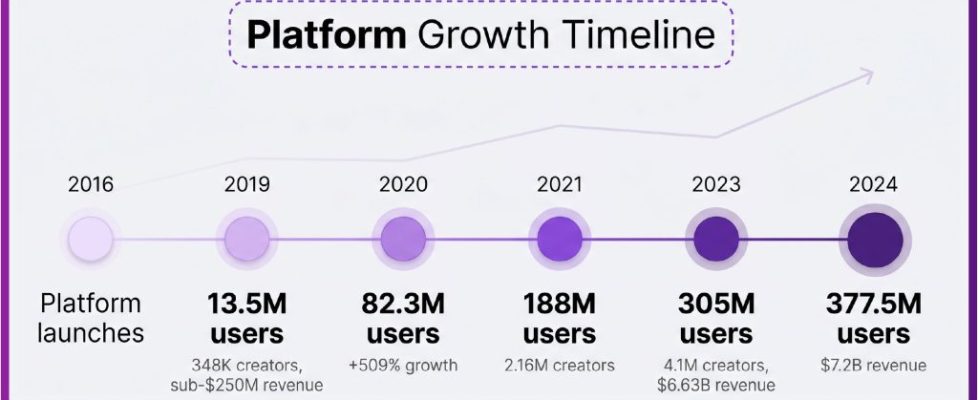
The bar chart above shows how quickly the audience grew, but growth in users does not mean growth in active creators. Supply expanded fast, and many accounts were opened, tested for a few weeks, and then left in place. That is normal on any subscription platform.
Why abandoned pages stay visible
Account deletion is a deliberate act, and most people who stop posting never get around to it. Leaving a page up costs nothing, and it leaves the door open if the creator wants to return later. Meanwhile, any directory that indexed the page keeps the entry unless someone reports it.
A dormant page can also keep generating income without new posts. Free pages earn through pay-per-view messages and tips, and old media inside the feed keeps selling. A paid page with an active subscriber base keeps collecting renewals until people cancel.
Common reasons a dormant page still appears in listings:
- The creator paused posting but never deleted the account.
- Auto-renew kept charging existing subscribers after the last upload.
- Directory entries were indexed once and never re-checked.
- The bio still describes a posting schedule that no longer happens.
- The account was repurposed from another platform and never cleaned up.
None of these are scams by themselves. They are ordinary outcomes of a platform with no removal process for inactive profiles.

The recency signals you can see first
Start with the newest post date and work backwards. If the top post is more than a month old, the page is either paused or winding down. Check the pinned post separately, because pins often stay in place long after the content under them stopped.
Timestamps on a platform are hard to fake at scale. Anyone can delete old posts, but only the account holder can add new ones, and the platform records when that happens. That is why the newest post date is the single most reliable signal on the page.
| Recency window | What it usually suggests |
| Posted within 7 days | Active, with normal posting rhythm |
| 8 to 30 days | Slow period or short break |
| 1 to 3 months | Paused, may or may not return |
| Over 3 months | Effectively abandoned |
The timeline above shows how the platform matured over roughly eight years. Older accounts were opened during earlier phases, when expectations about posting frequency were different. A 2019 account with a quiet feed in the present day is not unusual.

Engagement clues that are harder to fake
Like counts matter less than the pattern behind them. A page with one post that collected hundreds of likes and nothing since looks different from a page where every post collected a similar number over many months. Consistent engagement suggests a genuine audience that was built over time.
Comment activity is harder to stage than likes. Look at whether comments across different posts come from different accounts and whether replies from the creator appear. A creator who answered comments three months ago and nothing since is likely absent.
Paid pages in the typical range of $4.99 to $15 are not structured to support constant personal attention. Subscribers should price their expectations against what they are actually paying. The costs to expect month by month:
- $0 for a free page, with spending only on pay-per-view and tips.
- $4.99 to $15 for most paid pages, the standard band.
- $5 to $10 as the average range across paid accounts.
- $49.99 as the high end, only justified by frequent output.
- 20% platform fee on every subscription, tip, and pay-per-view purchase.
The creator keeps 80% of everything collected. That split applies to subscriptions, tips, and pay-per-view messages alike, so a page earning $10 per subscriber nets the creator $8 before any other costs.
Practical tip: if a paid page stops posting but auto-renew stays on, existing access continues until the current paid period ends. Cancel before the next renewal date, not after. Note that raising the subscription price stops auto-renew automatically, but you keep access until the period you already paid for runs out.

Testing responsiveness before you pay
A single low-cost message tells you more than an hour of scrolling. Send something short and specific, and watch what happens. A reply within a day suggests the account is monitored.
Free pages make this test cheap, because messaging costs nothing and pay-per-view only activates when you choose to buy. On a paid page, the test happens inside the subscription, so it makes sense to subscribe for the shortest available period first.
Fair expectations for response time:
- Same day: normal for an active page with a small audience.
- One to two days: acceptable on a busy account.
- Three to five days: a warning sign, not a dealbreaker.
- No reply after a week: treat the page as inactive.
The cancel dialog above is worth knowing before you subscribe. Cancelling stops the next renewal, and access continues until the current paid period ends. That gives you a clean exit if the responsiveness test fails. For a starting point, best onlyfans customs collects free pages.

Warning signs of a copied or repurposed page
Some pages are not run by the person they claim to represent. The clearest sign is media that appears elsewhere under a different name. Screenshots, reposted clips, and images with inconsistent lighting or quality are common in these cases.
Profile details often contradict each other on repurposed accounts. A location that changes between posts, an age that does not match the timeline, or a bio written in a different tone than the captions are all worth noting. None of these prove anything alone, but together they form a picture.
Details to cross-check:
- Whether the same media appears on other accounts under different names.
- Whether the stated location stays consistent across posts.
- Whether the bio tone matches the captions and messages.
- Whether the account links or references align with the creator identity.
- Whether the watermark, if any, matches the profile name.
Earnings distribution, shown above, explains why some pages go quiet without warning. Most creators earn modestly, and a page that never reached a stable income is easy to walk away from. That context helps separate a copied page from an honest one that simply stopped.

Deciding whether to follow anyway
A quiet page is not automatically a bad purchase. Some subscribers only want access to an existing library and never expect new posts. If the archive is large and the price is in the $4.99 to $15 band, a paused page can still deliver value for one month.
BestOnlyFans ranking pages often sort by activity level, which helps filter dormant accounts at the listing stage. That saves time, but the final check still happens on the profile itself. Directories update at different speeds, so treat any listing as a starting point rather than proof.
If you want custom content, the request process is usually arranged through direct messages, and the terms are set by the creator. Subscribers who compare options across several pages before committing tend to get clearer answers. A practical reference for that step is best onlyfans customs, which covers how requests are typically structured and priced.
| Page state | Sensible subscriber action |
| Active, posted this week | Subscribe for one month and reassess |
| Slow, posted this month | Message first, then decide |
| Paused, 1 to 3 months | Buy one month for the archive only |
| Abandoned, over 3 months | Skip, or follow free if available |
BestOnlyFans listings are not a substitute for the check, but they reduce the number of profiles you have to open. Use them to build a shortlist, then verify each candidate on the platform.
A short pre-follow routine
The whole check takes about five minutes once it becomes routine. Open the profile, note the newest post date, scan the pinned post, and read the bio for any schedule reference. Then look at two or three older posts and compare their engagement.
Raising the subscription price is a separate event worth remembering. When a creator raises the price, auto-renew stops, and existing access lasts until the current paid period ends. If you see a price change and no new posts, treat the page as paused rather than active. BestOnlyFans tracks some of these changes, but the profile remains the source of truth.
Mistakes to avoid:
- Judging activity from the profile photo alone.
- Assuming a high subscriber count means recent posts.
- Paying for a full year before testing responsiveness.
- Ignoring the renewal date after subscribing to a paused page.
- Trusting a directory listing without checking the profile.
Account settings and help pages are where you manage subscriptions and check billing. The help centre above shows the login window most subscribers use to reach those controls. It is the same place you go to cancel, review payment history, or update a payment method.
Two-step authentication protects the account itself, which matters if you subscribe to several pages. Turn it on before you start adding payment methods. It prevents the kind of access problem that makes people lose track of which subscriptions are still renewing.
With those habits in place, judging a page takes a few minutes and rarely leads to a surprise charge. The signals are visible, and the platform gives you enough information to act on them.
FAQ
Can a page disappear on its own if the creator stops posting?
No. Pages stay online until the account holder deletes them or the platform removes them for a policy breach, so inactivity alone changes nothing.
Is there any subscription price below $4.99?
No. The minimum is $4.99, and only promotional first months may dip below that figure.
What happens to my access if the creator raises the price?
Auto-renew stops when the price changes, and your access continues until the paid period you already purchased ends.
How much does the platform take from each payment?
OnlyFans takes 20% of subscriptions, tips, and pay-per-view purchases, and the creator keeps the remaining 80%.